Nx Witness User Manual
Connecting a Site to a Cloud Account will enable Nx Cloud features and additional connection methods. Sites can be connected using the Desktop Client or the Nx Witness WebAdmin Interface.
When User log into Nx Cloud are able to access all the Sites that are connected to their Nx Cloud account (see "Connecting to Site from the Welcome Screen").
The following operations are possible with the Cloud:
•Log in to any Cloud Site without reentering credentials.
•Share access to Nx Cloud with other Cloud Users.
•Share Sites with users and add users to Permission Groups. This action is logged in the Audit Trail of User Actions.
To Connect a Site to Nx Cloud
It is necessary to have a Nx Cloud account first (see "Creating a Nx Cloud".)
Desktop Client
1.Open Main Menu > Site Administration and go to the Nx Cloud tab.
2.Click Connect Site to Nx Cloud and log in the Nx Cloud where the Site will be connected.
Web Admin
1.Open the Web Admin and log in.
2.Go to Settings > Site Administration > General.
3.Click Connect to Nx Cloud and log in to Nx Cloud where the Site will be connected.
Once connected, the Site will be displayed in the Nx Cloud Portal and will be accessible when logged into the Cloud.
To Disconnect a Site from Nx Cloud
NOTE: Disconnecting a Site will remove access for all Cloud Users that this Site is shared with.
Desktop Client
1.Log in as a Site Administrator.
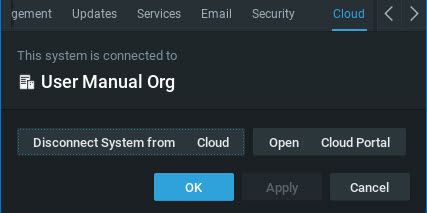
2.Open Main Menu > Site Administration and go to the Nx Cloud tab.
3.Click Disconnect Site from Nx Cloud and authenticate if prompted.
4.Confirm Disconnection and the removal of all Cloud Users from the Site.
Web Admin / Cloud Portal
1.Open the Web Admin and login as a Site Administrator.
2.Go to Settings tab in the header menu.
3.Select Site Administration > General on the left panel.
4.Click Disconnect Site from Nx Cloud and authenticate if prompted.
5.Confirm Disconnection and the removal of all Cloud Users from the Site.